GUI Hub
GUI Hub Essentials / FFmpeg

Video Toolkit

The FFmpeg app and MCP server

Shrink videos for email or Discord, convert video and audio, pull out MP3s, even out volume, make GIFs and trim clips — on your own computer, no uploading.

Free · no account · 3 free uses of every tool · also for Mac (Intel), Windows, Linux

Part of GUI Hub Essentials.
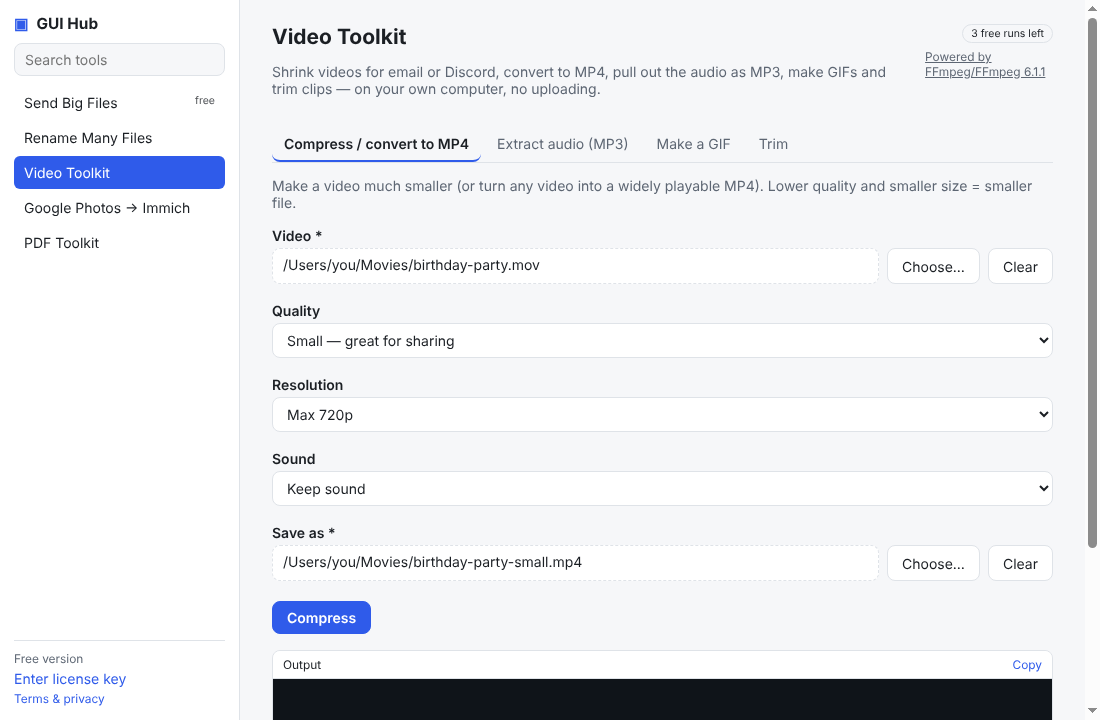
Video Toolkit in GUI Hub
In the app

What it can do

Compress / convert to MP4

Make a video much smaller (or turn any video into a widely playable MP4). Lower quality and smaller size = smaller file.

Extract audio (MP3)

Save just the sound of a video as an MP3 — for music, lectures or podcasts.

Convert audio

Convert any audio (or the sound of a video) to MP3, M4A, WAV or FLAC — and optionally even out the volume so quiet recordings are easy to hear.

Make a GIF

Turn a short part of a video into a good-looking animated GIF.

Trim

Cut out a part of a video instantly, without re-encoding (no quality loss). Cuts snap to the nearest keyframe.

Step-by-step guides

For your AI

Ask Claude, Cursor or VS Code to do it

GUI Hub gives your assistant these 5 tools. Install it once (below) and ask in plain words.

MCP toolWhat it doesInputs
ffmpeg_compressMake a video much smaller (or turn any video into a widely playable MP4). Lower quality and smaller size = smaller file.input* string
quality string
size string
audio string
out* string
ffmpeg_audioSave just the sound of a video as an MP3 — for music, lectures or podcasts.input* string
bitrate string
out* string
ffmpeg_audio_convertConvert an audio or video file's sound to mp3, m4a, wav or flac. normalize=true applies EBU R128 loudness normalization (loudnorm) — good for voice recordings and podcasts.input* string
format string
normalize boolean
out* string
ffmpeg_gifTurn a short part of a video into a good-looking animated GIF.input* string
start string
duration number
width string
out* string
ffmpeg_trimCut out a part of a video instantly, without re-encoding (no quality loss). Cuts snap to the nearest keyframe.input* string
start* string
end* string
out* string

* required

Install

Ready in two minutes

Free to try — 3 full uses of every tool.

1Claude Desktop

Download the one-file GUI Hub Essentials extension, double-click it, press Install. Done — ask Claude.

Download for Claude

2Cursor, VS Code, Claude Code, Windsurf

Add an MCP server with this command (needs Node.js 18+):

npx -y https://guihub.cc/mcp.tgz --product=essentials

Claude Code:

claude mcp add gui-hub-essentials -- npx -y https://guihub.cc/mcp.tgz --product=essentials

3The GUI Hub Essentials app

Point-and-click forms for every Essentials tool, plus a Use with AI button that connects Claude Desktop or Cursor for you.

Download for Windows

Mac (Intel) · Windows · Linux

Windows or macOS shows a warning when I open the app
  1. Windows “protected your PC”: click More info → Run anyway.
  2. macOS “can’t be verified”: click Done, then System Settings → Privacy & Security → Open Anyway.
  3. Linux: allow executing the AppImage (Properties → Permissions), then run it.

New independent apps get this one-time caution.

Under the hood

The real FFmpeg, not an imitation.

“Compress / convert to MP4” runs the official FFmpeg 6.1.1 program with arguments passed directly — never through a shell.

ffmpeg -y -i /Users/you/Movies/in.mov -vcodec libx264 -crf 28 -preset medium -pix_fmt yuv420p -acodec aac -ab 128k -movflags +faststart /Users/you/out.mp4

Simple, honest pricing

Use Video Toolkit 3 times free. $9 once unlocks all of GUI Hub Essentials.

GUI Hub Essentials

$9
once — not a subscription
  • Every Essentials tool, unlimited
  • Caesium, croc, F2, FFmpeg, immich-go, Pandoc, pdfcpu, Typst
  • Future tools in this product
  • Up to 3 computers
Get Essentials for $9

GUI Hub All-Access

$19
once — not a subscription
  • Every product, unlimited
  • Essentials + Data — and every future product
  • Up to 3 computers
  • 30-day money-back guarantee
Get All-Access for $19

Every tool works 3 times free first. Secure checkout by Polar; your license key arrives by email — paste it into the app, or just give it to your AI. 30-day refunds.

Other tools

Powered by FFmpeg 6.1.1 (GPL-3.0 (static build)), static build from eugeneware/ffmpeg-static, downloaded from its official release and verified by SHA-256. GUI Hub is independent and not affiliated with FFmpeg.