GUI Hub
GUI Hub Essentials / F2

Rename Many Files

The F2 app and MCP server

Rename hundreds of files at once — numbering, find and replace, photo dates. Preview first, undo any time.

Free · no account · 3 free uses of every tool · also for Mac (Intel), Windows, Linux

Part of GUI Hub Essentials.
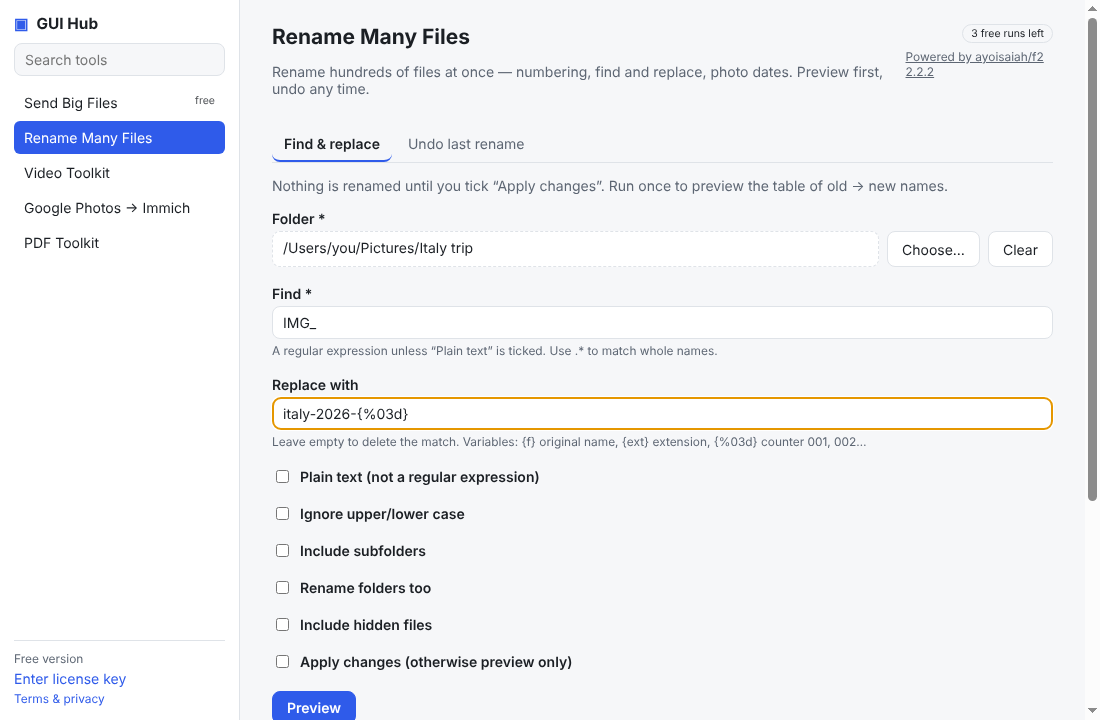
Rename Many Files in GUI Hub
In the app

What it can do

Find & replace

Nothing is renamed until you tick “Apply changes”. Run once to preview the table of old → new names.

Undo last rename

Reverse the most recent rename applied in a folder.

Step-by-step guides

For your AI

Ask Claude, Cursor or VS Code to do it

GUI Hub gives your assistant these 2 tools. Install it once (below) and ask in plain words.

MCP toolWhat it doesInputs
f2_renameBulk-rename files in a folder by find & replace (regex unless literal=true; variables like {%03d} counter and {ext}). Without apply=true it is a dry run that returns the old→new table — show it to the user before applying.folder* string
find* string
replace string
literal boolean
ignoreCase boolean
recursive boolean
dirs boolean
hidden boolean
apply boolean
f2_undoUndo the most recent rename that was applied in this folder.folder* string

* required

Install

Ready in two minutes

Free to try — 3 full uses of every tool.

1Claude Desktop

Download the one-file GUI Hub Essentials extension, double-click it, press Install. Done — ask Claude.

Download for Claude

2Cursor, VS Code, Claude Code, Windsurf

Add an MCP server with this command (needs Node.js 18+):

npx -y https://guihub.cc/mcp.tgz --product=essentials

Claude Code:

claude mcp add gui-hub-essentials -- npx -y https://guihub.cc/mcp.tgz --product=essentials

3The GUI Hub Essentials app

Point-and-click forms for every Essentials tool, plus a Use with AI button that connects Claude Desktop or Cursor for you.

Download for Windows

Mac (Intel) · Windows · Linux

Windows or macOS shows a warning when I open the app
  1. Windows “protected your PC”: click More info → Run anyway.
  2. macOS “can’t be verified”: click Done, then System Settings → Privacy & Security → Open Anyway.
  3. Linux: allow executing the AppImage (Properties → Permissions), then run it.

New independent apps get this one-time caution.

Under the hood

The real F2, not an imitation.

“Find & replace” runs the official F2 2.2.2 program with arguments passed directly — never through a shell.

f2 -f IMG_ -r "trip-{%03d}"

Simple, honest pricing

Use Rename Many Files 3 times free. $9 once unlocks all of GUI Hub Essentials.

GUI Hub Essentials

$9
once — not a subscription
  • Every Essentials tool, unlimited
  • Caesium, croc, F2, FFmpeg, immich-go, Pandoc, pdfcpu, Typst
  • Future tools in this product
  • Up to 3 computers
Get Essentials for $9

GUI Hub All-Access

$19
once — not a subscription
  • Every product, unlimited
  • Essentials + Data — and every future product
  • Up to 3 computers
  • 30-day money-back guarantee
Get All-Access for $19

Every tool works 3 times free first. Secure checkout by Polar; your license key arrives by email — paste it into the app, or just give it to your AI. 30-day refunds.

Other tools

Powered by F2 2.2.2 (MIT), downloaded from its official release and verified by SHA-256. GUI Hub is independent and not affiliated with F2.