GUI Hub
GUI Hub Essentials / Caesium

Image Compressor

The Caesium app and MCP server

Shrink photos and images for email, websites and upload limits — compress, resize and convert to JPG or WebP, a whole folder at a time.

Free · no account · 3 free uses of every tool · also for Mac (Intel), Windows, Linux

Part of GUI Hub Essentials.
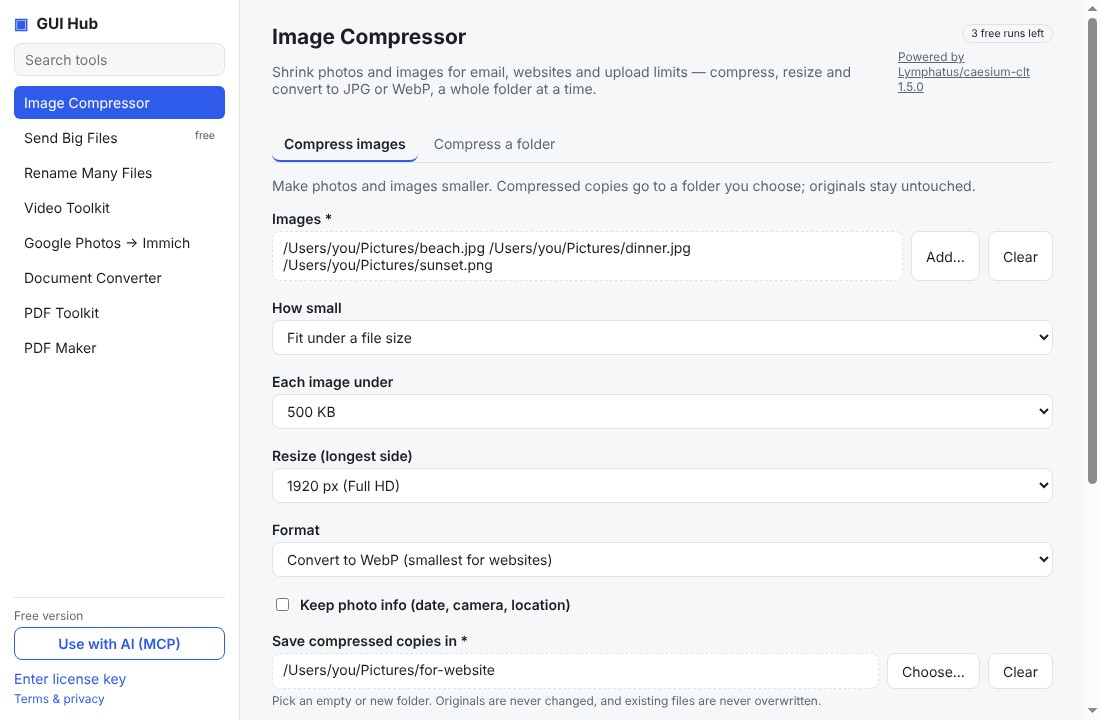
Image Compressor in GUI Hub
In the app

What it can do

Compress images

Make photos and images smaller. Compressed copies go to a folder you choose; originals stay untouched.

Compress a folder

Compress every image in a folder (and optionally its subfolders) in one go.

Step-by-step guides

For your AI

Ask Claude, Cursor or VS Code to do it

GUI Hub gives your assistant these 2 tools. Install it once (below) and ask in plain words.

MCP toolWhat it doesInputs
caesium_compressCompress, resize and/or convert image files (JPG, PNG, WebP, GIF, TIFF) on the user's computer. Writes compressed copies (same file names) into outDir; never modifies originals or overwrites existing files. Use mode=size with maxSize (bytes) to fit upload limits.inputs* array
mode string
quality string
maxSize string
resize string
format string
exif boolean
outDir* string
caesium_folderCompress, resize and/or convert every image in a folder on the user's computer, optionally including subfolders (folder structure is kept). Copies go to outDir; originals are never modified.folder* string
recursive boolean
mode string
quality string
maxSize string
resize string
format string
exif boolean
outDir* string

* required

Install

Ready in two minutes

Free to try — 3 full uses of every tool.

1Claude Desktop

Download the one-file GUI Hub Essentials extension, double-click it, press Install. Done — ask Claude.

Download for Claude

2Cursor, VS Code, Claude Code, Windsurf

Add an MCP server with this command (needs Node.js 18+):

npx -y https://guihub.cc/mcp.tgz --product=essentials

Claude Code:

claude mcp add gui-hub-essentials -- npx -y https://guihub.cc/mcp.tgz --product=essentials

3The GUI Hub Essentials app

Point-and-click forms for every Essentials tool, plus a Use with AI button that connects Claude Desktop or Cursor for you.

Download for Windows

Mac (Intel) · Windows · Linux

Windows or macOS shows a warning when I open the app
  1. Windows “protected your PC”: click More info → Run anyway.
  2. macOS “can’t be verified”: click Done, then System Settings → Privacy & Security → Open Anyway.
  3. Linux: allow executing the AppImage (Properties → Permissions), then run it.

New independent apps get this one-time caution.

Under the hood

The real Caesium, not an imitation.

“Compress images” runs the official Caesium 1.5.0 program with arguments passed directly — never through a shell.

caesiumclt --quality 80 --no-upscale --format original --output /Users/you/out --overwrite never /Users/you/a.pdf /Users/you/b.pdf

Simple, honest pricing

Use Image Compressor 3 times free. $9 once unlocks all of GUI Hub Essentials.

GUI Hub Essentials

$9
once — not a subscription
  • Every Essentials tool, unlimited
  • Caesium, croc, F2, FFmpeg, immich-go, Pandoc, pdfcpu, Typst
  • Future tools in this product
  • Up to 3 computers
Get Essentials for $9

GUI Hub All-Access

$19
once — not a subscription
  • Every product, unlimited
  • Essentials + Data — and every future product
  • Up to 3 computers
  • 30-day money-back guarantee
Get All-Access for $19

Every tool works 3 times free first. Secure checkout by Polar; your license key arrives by email — paste it into the app, or just give it to your AI. 30-day refunds.

Other tools

Powered by Caesium 1.5.0 (Apache-2.0), downloaded from its official release and verified by SHA-256. GUI Hub is independent and not affiliated with Caesium.