How to compress a video for Discord, email or WhatsApp — free of uploads, on your own computer
Shrink a video to fit Discord, email or messaging limits in a few clicks, without uploading it to a compression website.
Free · no account · 3 free uses of every tool · also for Mac (Intel), Windows, Linux
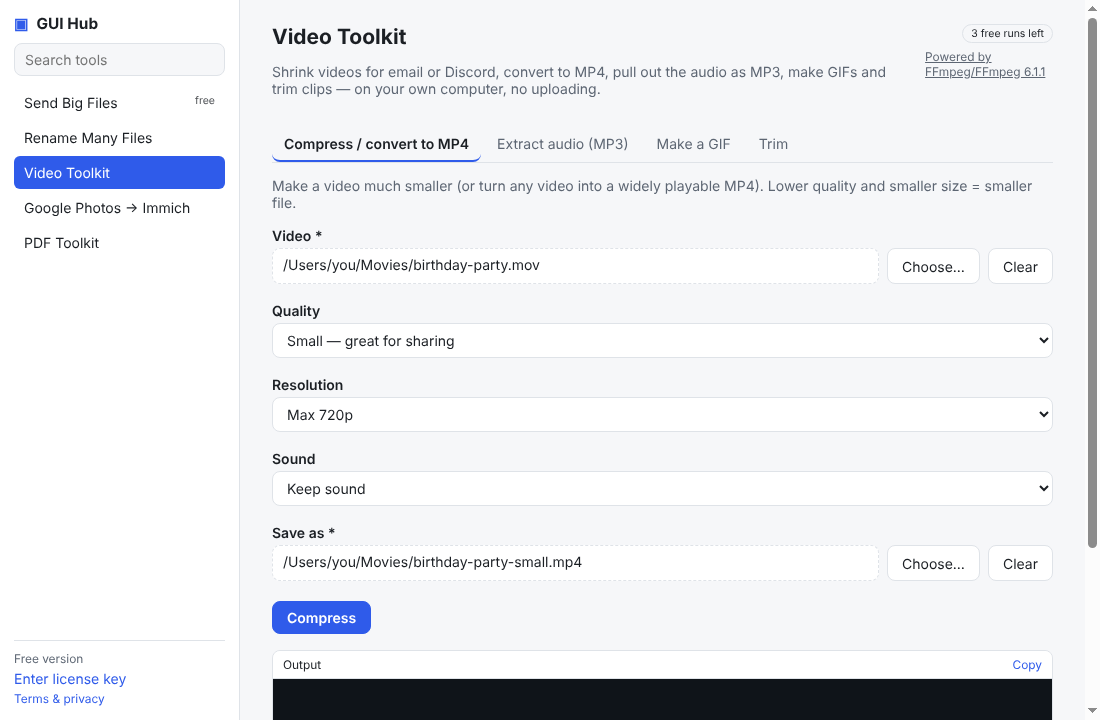
Phone videos are huge: a one-minute 4K clip can be several hundred megabytes, while Discord, email and many forms only accept small files. Online compressors make you upload the video first, which is slow and not private. This does the same on your computer.
Steps
- Open GUI Hub → Video Toolkit → Compress / convert to MP4.
- Choose your video.
- Pick Quality: Tiny and Resolution: Max 720p for messaging limits, or Small and Max 1080p for good-looking sharing.
- Choose where to save and press Compress.
How much smaller?
Typical phone footage shrinks by 70–95% at Small + 720p, while still looking good on a phone screen. If the file is still too big, try Tiny and 480p, or trim the clip first with the Trim tab.
Also converts
The result is always an MP4 that plays everywhere — handy for .mov files from iPhones or .mkv files that won't open on a TV.
What powers it
FFmpeg, the open-source engine behind most video software (GPL). GUI Hub downloads a static FFmpeg build from its GitHub release and verifies it.
Try it now
Free download — use it 3 times free. $9 once unlocks everything. Prefer to ask your AI? GUI Hub also works as an MCP server for Claude, Cursor and others.