An offline TinyPNG alternative for whole folders of photos
Compress JPG, PNG and WebP images on your own computer — a whole folder at once, with a target size like 500 KB, and nothing uploaded.
Free · no account · 3 free uses of every tool · also for Mac (Intel), Windows, Linux
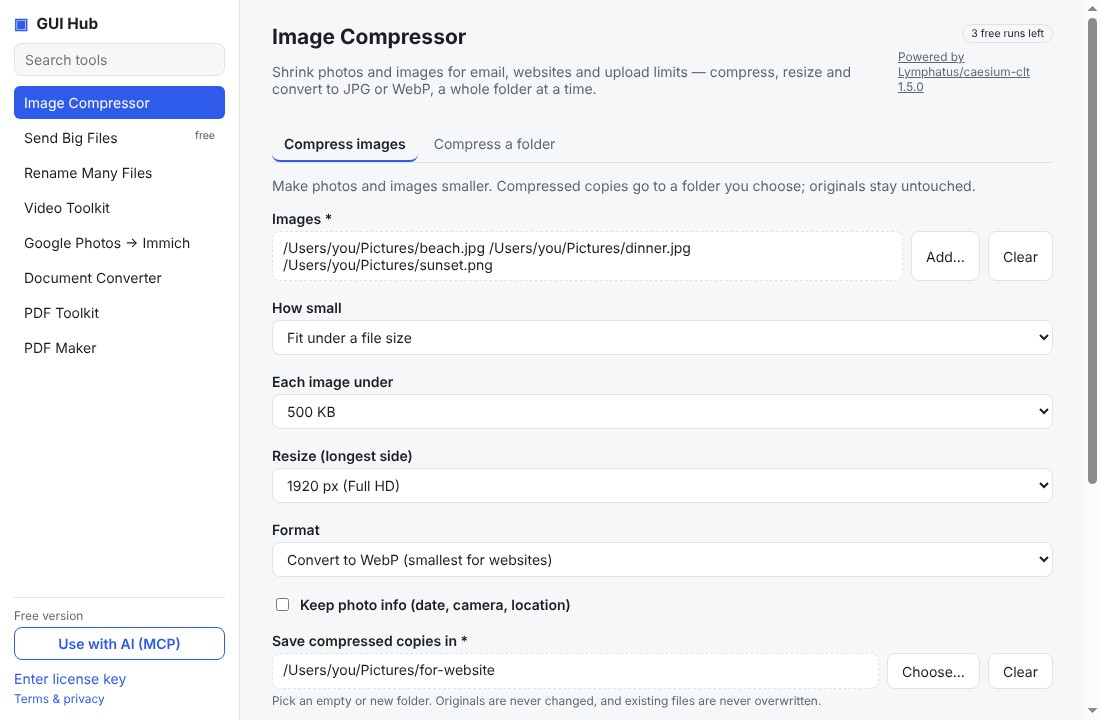
Online compressors such as TinyPNG and Squoosh are great for a few images. They get slow when you have a whole folder of holiday photos, product shots or scans — and every file has to be uploaded to someone else’s server first.
When an online compressor is fine
- A handful of images, nothing private.
- You are on a phone or a computer where you can’t install anything.
When an offline app is better
- Many files: drop a folder (and its subfolders) and compress everything in one go.
- Upload limits: choose “each image under 500 KB” (or 1 MB, 200 KB…) and every file is squeezed to fit.
- Privacy: ID scans, client photos and family pictures never leave your computer.
- Resize and convert in the same step: longest side 1920 px, output as WebP or JPG.
- Your AI can do it: ask Claude “resize the photos in ~/Pictures/trip to 1920 px, each under 500 KB”.
How to do it
- Download GUI Hub Essentials and open Image Compressor.
- Choose Compress a folder, pick the folder and an empty output folder.
- Pick a quality, or Fit under a file size, then press Compress.
Originals are never changed. The engine is Caesium (Apache-2.0), downloaded from its official release. Each tool has 3 free uses; Essentials is $9 once after that.
Try it now
Free download — use it 3 times free. $9 once unlocks everything. Prefer to ask your AI? GUI Hub also works as an MCP server for Claude, Cursor and others.