A simpler alternative to HandBrake for shrinking videos
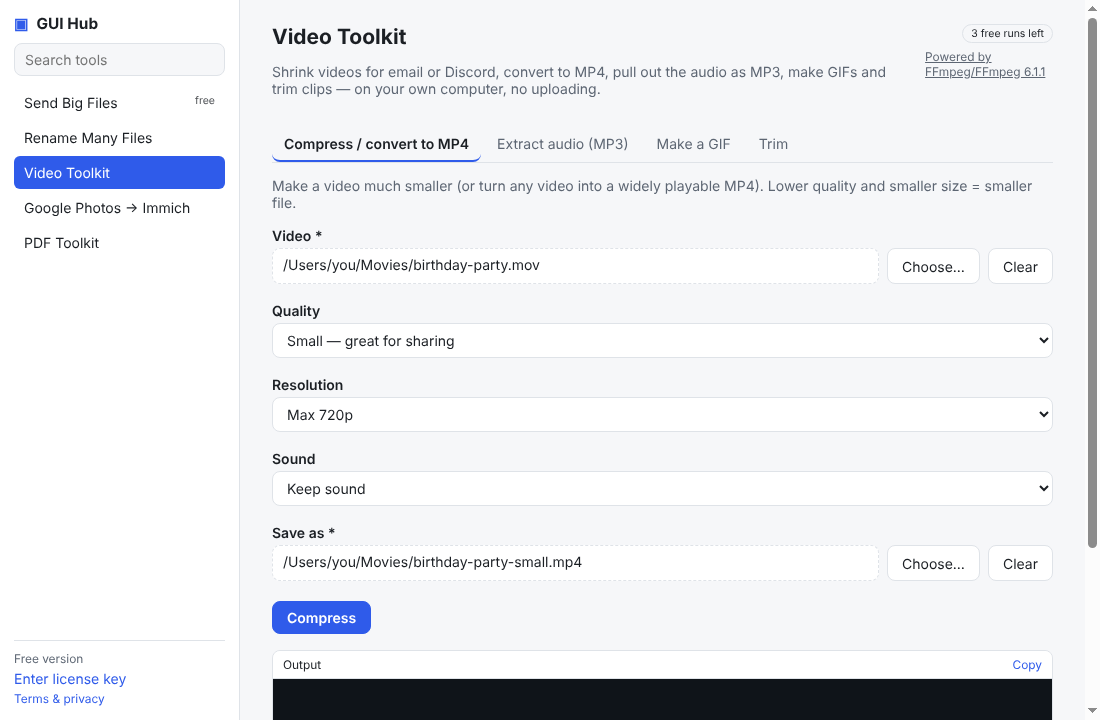
Make a video small enough for Discord, email or WhatsApp in three clicks — no presets, codecs or bitrates to understand.
Free · no account · 3 free uses of every tool · also for Mac (Intel), Windows, Linux
HandBrake is excellent and free — and it shows you dozens of settings. If all you want is “make this video small enough to send”, there is a quicker way.
Three choices, plain words
- Quality: High, Good, Small, or Tiny (for Discord and email limits).
- Resolution: keep it, or cap it at 1080p, 720p or 480p.
- Sound: keep or remove.
It always produces a widely playable MP4, so the result opens on phones, Macs and Windows alike.
Also in the same app
Extract the audio as MP3, turn a clip into a GIF, trim without re-encoding, and convert or even out the volume of audio files.
Or ask your AI
“Shrink party.mov so it fits on Discord.” — Claude or Cursor runs it on your computer.
How to start
Download GUI Hub Essentials and open Video Toolkit. The engine is FFmpeg, the same one inside HandBrake and most video apps. 3 free uses per tool; $9 once after that.
Try it now
Free download — use it 3 times free. $9 once unlocks everything. Prefer to ask your AI? GUI Hub also works as an MCP server for Claude, Cursor and others.